> ## Documentation Index
> Fetch the complete documentation index at: https://developers.entri.com/llms.txt
> Use this file to discover all available pages before exploring further.
# Handling DKIM, SPF, and DMARC Records
> Add and manage DKIM, SPF, and DMARC email-authentication records through Entri.
## DKIM records
DKIM (DomainKeys Identified Mail) is an email security standard designed to make sure messages aren't altered in transit between the sending and recipient servers. If a DKIM record is added to a domain, it increases the deliverability of emails.
### Sending mail directly
If your application sends mail directly, you can simply add a DKIM record to your configuration object as a TXT record (see [Getting Started](/getting-started)), e.g.:
```Java Text theme={"system"}
const config = {
applicationId: "12345",
dnsRecords: [
{
type: "TXT",
host: "cool-email.example.com",
value: "v=DKIM1; p=76E629F05F70 9EF665853333 EEC3F5ADE69A 2362BECE4065 8267AB2FC3CB 6CBE",
ttl: 300,
},
],
};
```
### Sending mail through a 3rd party
If your application sends email using a 3rd party service configured by your customer (e.g. Google Workspace, Zoho Mail, or Microsoft 365), your Entri account manager can enable a DKIM prompt that walks your customers through setting up DKIM using those services.
To turn this on, add the [`enableDkim`](/connect/configuration) key to your configuration object:
```Java Text theme={"system"}
const config = {
applicationId: "12345",
enableDkim: true,
dnsRecords: [
// ...
],
};
```
Once DKIM is enabled for your application, the Entri modal will detect what email provider a domain uses (Entri supports Google Workspace, Microsoft 365, Zoho Mail).
Depending on the provider, Entri will show instructions for how to set up DKIM after the other types of records have been added. If Entri detects that DKIM has already been set up, we will skip this step.
For example:
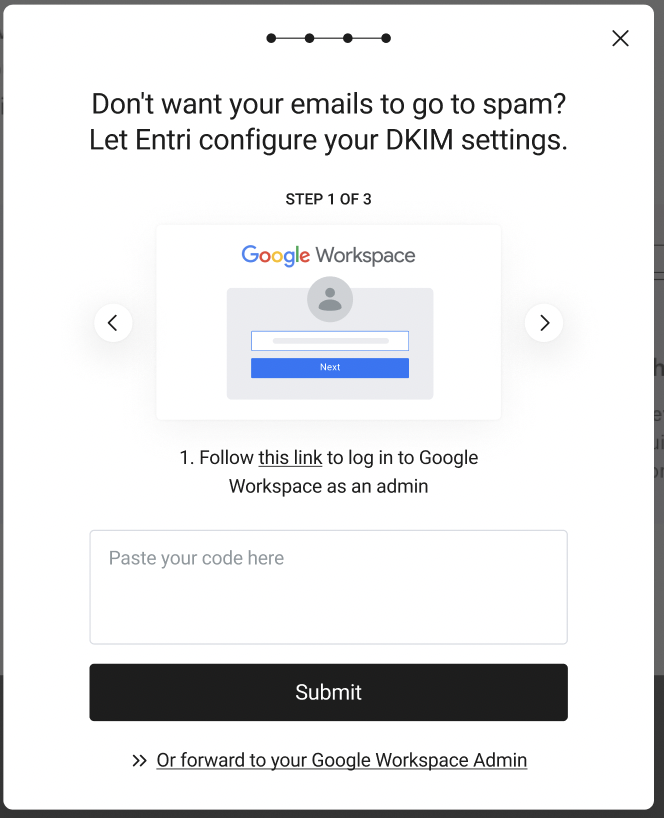 Entri UI for Assisting Google Workspace customers with DKIM setup
## SPF records
**Important** When providing Entri the SPF record using the script found on
the [Installing Entri](/getting-started) page, the record type must be identified as
TXT.
When providing Entri the desired SPF record, please include the full SPF record. For example:
```Text Text theme={"system"}
v=spf1 include:u123456.wl.sendgrid.net -all
```
If the user has an existing SPF record, Entri will automatically append the new SPF record inside the users existing SPF record. For example:
**Record sent to Entri:**
```Text Text theme={"system"}
v=spf1 a mx include:u826348.wl.sendgrid.net -all
```
**Existing record:**
```Text Text theme={"system"}
v=spf1 a mx include:\_spf.google.com include:spf.protection.outlook.com -all
```
**Updated Record:**
```Text Text theme={"system"}
v=spf1 a mx include:\_spf.google.com include:spf.protection.outlook.com include:u826348.wl.sendgrid.net -all
```
**Important**
If Entri compares the existing record with the record from the end-user and there’s a conflict with the appendix (\~all vs -all) then we will use \~all by default. \~all is recommended as it minimizes SPF errors.
### How GoDaddy Uses Nested Includes for SPF
When handling SPF records through Domain Connect, GoDaddy follows a strategy that avoids directly modifying the root domain’s existing SPF record. Instead, GoDaddy creates a dedicated subdomain (typically in the form of `dc-._spfm.`) and publishes its SPF configuration there. This subdomain contains the necessary mechanisms, such as ip4, ip6, or additional include statements, to authorize GoDaddy’s sending infrastructure. The main SPF record on the root domain is then updated to reference this subdomain using an include mechanism (e.g., `include:dc-._spfm.)`. This approach creates a nested include, where the parent SPF record delegates authorization to GoDaddy via the subdomain. This method helps keep the root SPF record cleaner, allows modular updates to the provider-specific SPF content, and reduces the risk of accidentally breaking existing SPF configurations.
For example, consider a domain `mydomain.com` that initially has the following SPF record:
```Text Text theme={"system"}
TXT @ v=spf1 include:mail.sampledomain.com ~all
```
Then, a new record is submitted to Entri:
```Text Text theme={"system"}
TXT @ v=spf1 include:newvendor.com ~all
```
GoDaddy will merge both records using a nested include, resulting in:
```Text Text theme={"system"}
TXT @ v=spf1 include:mail.sampledomain.com include:dc-bbalbf040d._spfm.mydomain.com ~all
TXT dc-bba1bf040d._spfm v=spf1 include:newvendor.com ~all
```
### GoDaddy SPF Records and Webhooks
Our propagation check process is designed to account for nested SPF structures, such as those used by GoDaddy through Domain Connect. When verifying record propagation, Entri Connect will follow include chains and subdomain delegations to ensure that the original SPF record specified in the connectDomain configuration is present and resolvable under the domain.
Continuing the example above, even though GoDaddy published the record as:
```Text Text theme={"system"}
TXT @ v=spf1 include:mail.sampledomain.com include:dc-bbalbf040d._spfm.mydomain.com ~all
TXT dc-bba1bf040d._spfm v=spf1 include:newvendor.com ~all
```
The webhook notification will surface it in a simplified form, reflecting the original intent of the configuration:
```Text Text theme={"system"}
{
"data": {
"records_non_propagated": [],
"records_propagated": [
{
"type": "TXT",
"host": "@",
"value": "v=spf1 include:mail.sampledomain.com ~all"
}
]
}
//...
}
```
## DMARC records
To set up DMARC records for your users, include a TXT record with `_dmarc` as the host value in your configuration object (see [Installation](/getting-started)), e.g.
```JavaScript JavaScript theme={"system"}
const config = {
applicationId: "12345",
dnsRecords: [
{
type: "TXT",
host: "_dmarc",
value: "v=DMARC1; p=none; rua=mailto:dmarc-reports@solarmora.com",
ttl: 300,
},
],
};
```
#### Optional: Check for existing DMARC record
If you want to check if your user has a valid DMARC record already set, and if so, **not** update it, you can set the `validateDmarc` property to `true` in your `config`.
**Need Advanced DMARC handling?** Check out our [DMARC Handling: Advanced Options](/advanced-dmarc-options) section!
Entri UI for Assisting Google Workspace customers with DKIM setup
## SPF records
**Important** When providing Entri the SPF record using the script found on
the [Installing Entri](/getting-started) page, the record type must be identified as
TXT.
When providing Entri the desired SPF record, please include the full SPF record. For example:
```Text Text theme={"system"}
v=spf1 include:u123456.wl.sendgrid.net -all
```
If the user has an existing SPF record, Entri will automatically append the new SPF record inside the users existing SPF record. For example:
**Record sent to Entri:**
```Text Text theme={"system"}
v=spf1 a mx include:u826348.wl.sendgrid.net -all
```
**Existing record:**
```Text Text theme={"system"}
v=spf1 a mx include:\_spf.google.com include:spf.protection.outlook.com -all
```
**Updated Record:**
```Text Text theme={"system"}
v=spf1 a mx include:\_spf.google.com include:spf.protection.outlook.com include:u826348.wl.sendgrid.net -all
```
**Important**
If Entri compares the existing record with the record from the end-user and there’s a conflict with the appendix (\~all vs -all) then we will use \~all by default. \~all is recommended as it minimizes SPF errors.
### How GoDaddy Uses Nested Includes for SPF
When handling SPF records through Domain Connect, GoDaddy follows a strategy that avoids directly modifying the root domain’s existing SPF record. Instead, GoDaddy creates a dedicated subdomain (typically in the form of `dc-._spfm.`) and publishes its SPF configuration there. This subdomain contains the necessary mechanisms, such as ip4, ip6, or additional include statements, to authorize GoDaddy’s sending infrastructure. The main SPF record on the root domain is then updated to reference this subdomain using an include mechanism (e.g., `include:dc-._spfm.)`. This approach creates a nested include, where the parent SPF record delegates authorization to GoDaddy via the subdomain. This method helps keep the root SPF record cleaner, allows modular updates to the provider-specific SPF content, and reduces the risk of accidentally breaking existing SPF configurations.
For example, consider a domain `mydomain.com` that initially has the following SPF record:
```Text Text theme={"system"}
TXT @ v=spf1 include:mail.sampledomain.com ~all
```
Then, a new record is submitted to Entri:
```Text Text theme={"system"}
TXT @ v=spf1 include:newvendor.com ~all
```
GoDaddy will merge both records using a nested include, resulting in:
```Text Text theme={"system"}
TXT @ v=spf1 include:mail.sampledomain.com include:dc-bbalbf040d._spfm.mydomain.com ~all
TXT dc-bba1bf040d._spfm v=spf1 include:newvendor.com ~all
```
### GoDaddy SPF Records and Webhooks
Our propagation check process is designed to account for nested SPF structures, such as those used by GoDaddy through Domain Connect. When verifying record propagation, Entri Connect will follow include chains and subdomain delegations to ensure that the original SPF record specified in the connectDomain configuration is present and resolvable under the domain.
Continuing the example above, even though GoDaddy published the record as:
```Text Text theme={"system"}
TXT @ v=spf1 include:mail.sampledomain.com include:dc-bbalbf040d._spfm.mydomain.com ~all
TXT dc-bba1bf040d._spfm v=spf1 include:newvendor.com ~all
```
The webhook notification will surface it in a simplified form, reflecting the original intent of the configuration:
```Text Text theme={"system"}
{
"data": {
"records_non_propagated": [],
"records_propagated": [
{
"type": "TXT",
"host": "@",
"value": "v=spf1 include:mail.sampledomain.com ~all"
}
]
}
//...
}
```
## DMARC records
To set up DMARC records for your users, include a TXT record with `_dmarc` as the host value in your configuration object (see [Installation](/getting-started)), e.g.
```JavaScript JavaScript theme={"system"}
const config = {
applicationId: "12345",
dnsRecords: [
{
type: "TXT",
host: "_dmarc",
value: "v=DMARC1; p=none; rua=mailto:dmarc-reports@solarmora.com",
ttl: 300,
},
],
};
```
#### Optional: Check for existing DMARC record
If you want to check if your user has a valid DMARC record already set, and if so, **not** update it, you can set the `validateDmarc` property to `true` in your `config`.
**Need Advanced DMARC handling?** Check out our [DMARC Handling: Advanced Options](/advanced-dmarc-options) section!